
Based on hands-on testing of Rhymer's Block in June 2026. Apps change, so if anything here is out of date, let us know and we'll update it.
Both are iOS lyrics apps with rhyme tools. Rhymer's Block runs ads, gates basic features like folders behind its Pro tier, pushes its social network hard, and, in our testing, missed rhymes Songwriter Studio caught. Songwriter Studio is account-free and ad-free, never pushes you to share, and has a more accurate rhyme engine with all suggestions free.
 Free on the App Store. No account required.
Songwriter Studio and Rhymer’s Block are both iOS apps for writing lyrics with built-in rhyming help, but they’re built on very different priorities. In hands-on testing, the practical differences came down to five things: Rhymer’s Block requires you to think about accounts and shows ads; it puts basic features like folders behind a paywall; it pushes its social network at almost every turn; and its rhyme detection missed matches that Songwriter Studio caught. Songwriter Studio is account-free and ad-free, never pressures you to share, has a more accurate rhyme engine, and keeps all of its rhyme suggestions free.
Below is what we found when we sat down and used both. This is a comparison written by the developer behind Songwriter Studio, so treat it as informed but partial. We’ve tried to keep every claim specific and backed by what’s on screen.
Do you need an account to write songs?
Songwriter Studio: no. Rhymer’s Block: effectively yes.
An account system just to write and share your own songs is, frankly, everything wrong with the modern app world. You wrote the song. It’s yours. Needing to register an identity with a company before you can jot down a verse is friction nobody asked for.
Songwriter Studio has no account system at all. There’s no sign-up and no password. If you want to share a song you tap the collaborate button and you get a shareable link: that’s the whole flow. Your iPhone does need to be signed into an iCloud account, but that’s an Apple-level security and sync requirement, not a Songwriter Studio account you have to create and manage. (More on how that sharing works in our guide to co-writing a song remotely.)
Does Rhymer’s Block have ads?
Yes. As tested, Rhymer’s Block shows advertisements. Songwriter Studio does not.
We were a little surprised and disappointed to see ads inside a songwriting app. Building and running an app isn’t free, and we don’t begrudge anyone making a living. But when you’re being creative, one of the most valuable things you can have is a distraction-free environment. The Beatles would be a very different band if every time Lennon and McCartney sat down to write they were interrupted by ads for pet insurance and Candy Crush clones.
You can pay for Rhymer’s Block’s Pro subscription to remove the ads. But that’s rather beside the point. Songwriter Studio doesn’t have ads in the first place, so there’s nothing to pay to remove.
Which app has better rhyme detection?
Rhyme detection matters most for a rhyming app, so we tested it directly: the same lyrics, typed into both apps, to see which words each one recognized as rhyming.
Building solid real-time rhyme detection is harder than it sounds. You can’t just grab a rhyming dictionary off the internet and hope for the best. You need to model phonetics, word structure, and pronunciation in a way that reflects how real songwriters and singers speak. Not everyone has the accent of a 1950s television announcer from New England.
In our test, Songwriter Studio detected a rhyme that Rhymer’s Block did not:
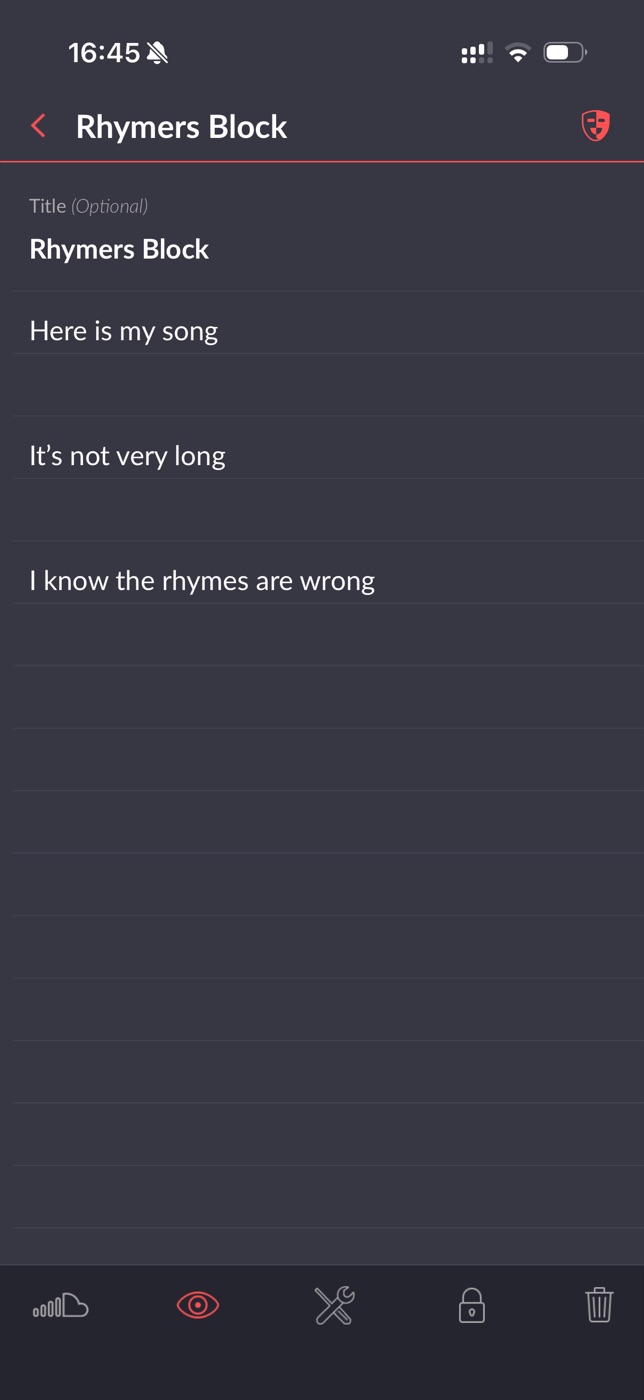
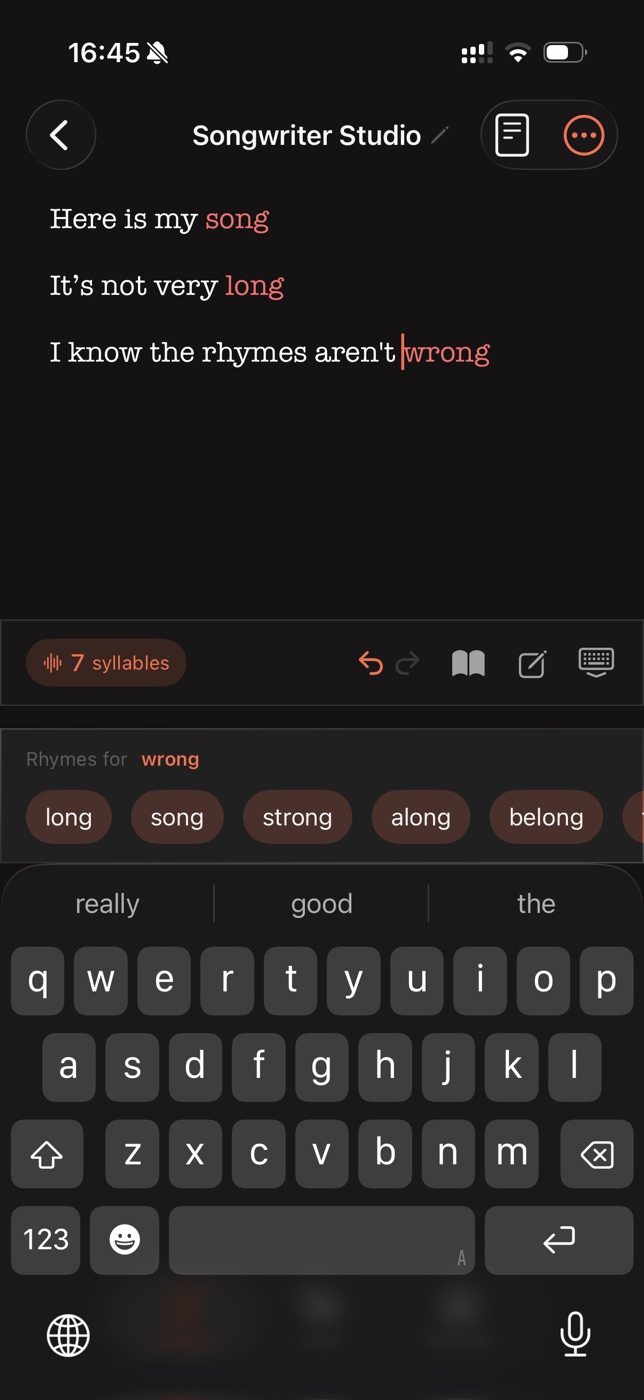
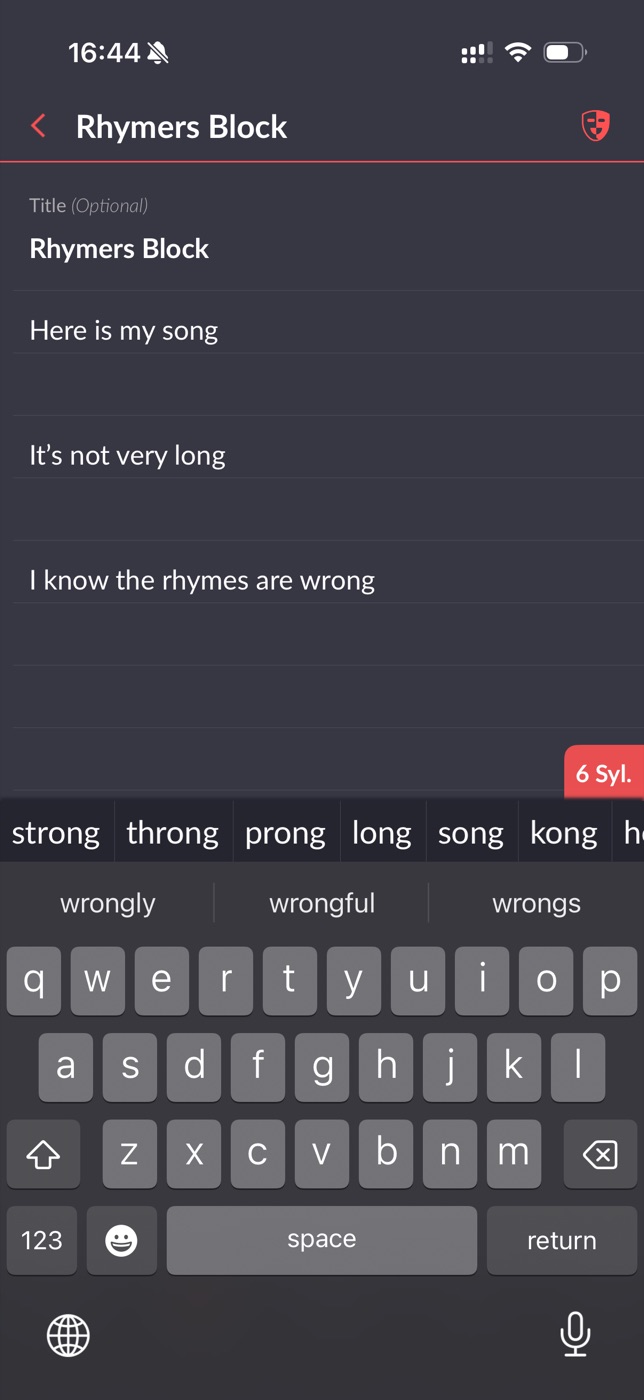
Rhymer’s Block failed to highlight the rhyme in the lyric, then offered the same word as a suggestion in its own suggestion bar. So one part of the app knew the words rhymed while the part doing live detection didn’t.
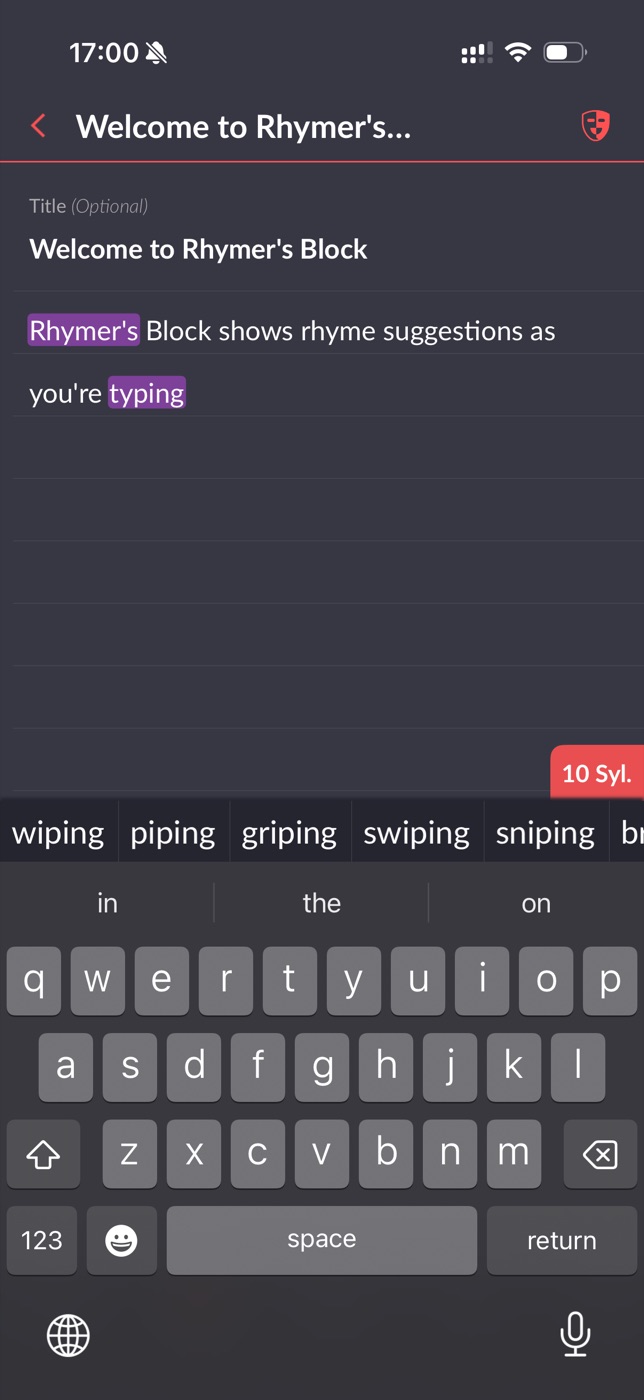
We also spotted a mistaken rhyme in Rhymer’s Block’s own example song: it believes its own name, “Rhymer’s”, rhymes with “typing”. It didn’t do this at first. Only once we added another genuine rhyme for “typing” did it get confused and fold “Rhymer’s” into the same rhyme group.
We don’t have any inside knowledge of how Rhymer’s Block’s engine works, but here’s our educated guess. Both words share the same stressed vowel sound, /aɪ/ (the “long I”):
- typing → /ˈtaɪp.ɪŋ/
- Rhymer’s → /ˈraɪm.ərz/
A proper rhyme check matches everything from the stressed vowel to the end of the word. By that standard “typing” rhymes with “piping” or “griping”, but not “Rhymer’s”, because everything after the /aɪ/ is different. A less sophisticated engine might only match the vowel nucleus (the /aɪ/) and ignore what follows. That’s detecting assonance (shared vowel sounds), not rhyme. We can’t say for certain that’s what’s happening, but it fits what we saw. (If the difference between vowel-matching and true rhyming is new to you, our explainer on perfect vs. slant vs. near rhyme breaks it down.)
What’s free, and what’s behind the paywall?
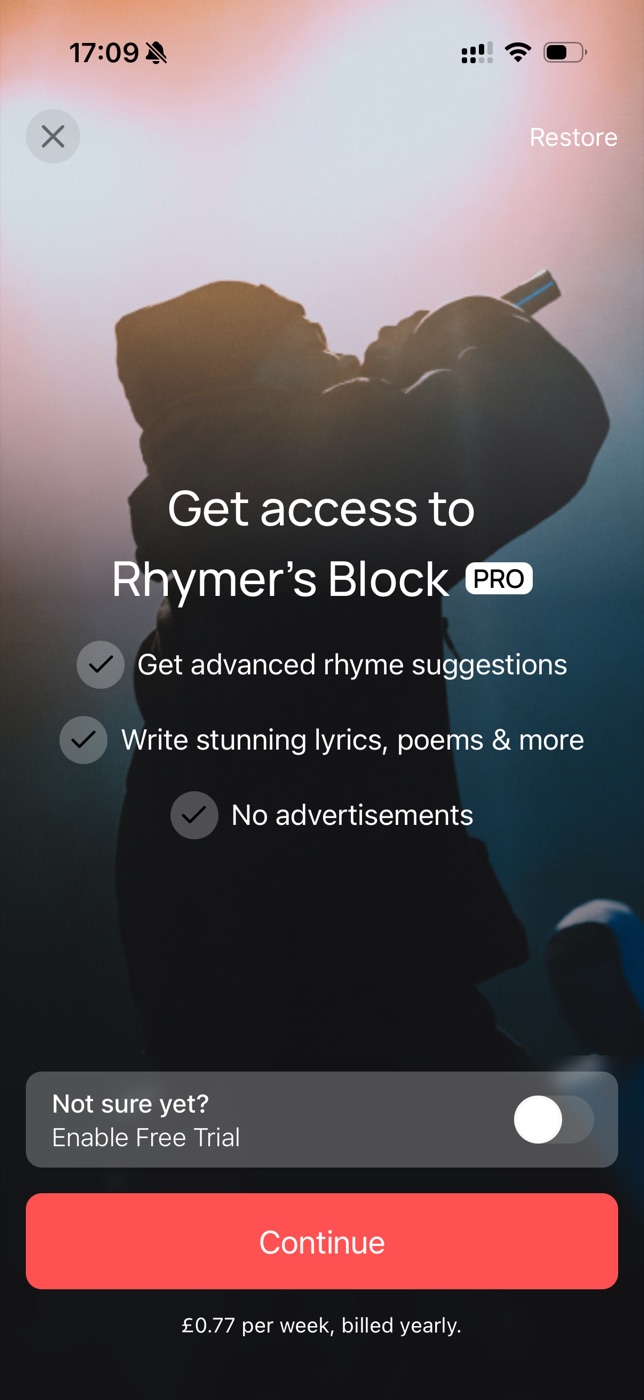
Rhymer’s Block’s Pro subscription removes ads. But Songwriter Studio has no ads to remove. Its Pro tier also advertises “advanced rhyme suggestions”, yet as shown above, Songwriter Studio’s rhyme engine is already more accurate and all of its rhyme suggestions are free.
Rhymer’s Block also puts some basic features behind its paywall. The ability to organize your songs into folders, for instance, is a Pro feature.
Songwriter Studio includes folders for free.
To be clear, Songwriter Studio does have a subscription too. We’re not pretending otherwise. But it’s aimed at power users: songwriting analysis, unlimited real-time collaboration, plus MIDI and ChordPro export. Free users get the full rhyme engine, folders, and real-time co-writing on one shared song at a time. The subscription is mostly a way for people who love the app to support its ongoing development, not a paywall on the basics.
How does sharing work in each app?
Songwriter Studio shares on your terms. Rhymer’s Block asks constantly.
Rhymer’s Block is persistent about getting you to share songs, particularly to its own social network, The Block. In testing, every single time we exited a song (for example, just to switch to a different one), it prompted us to share. It gets wearing.
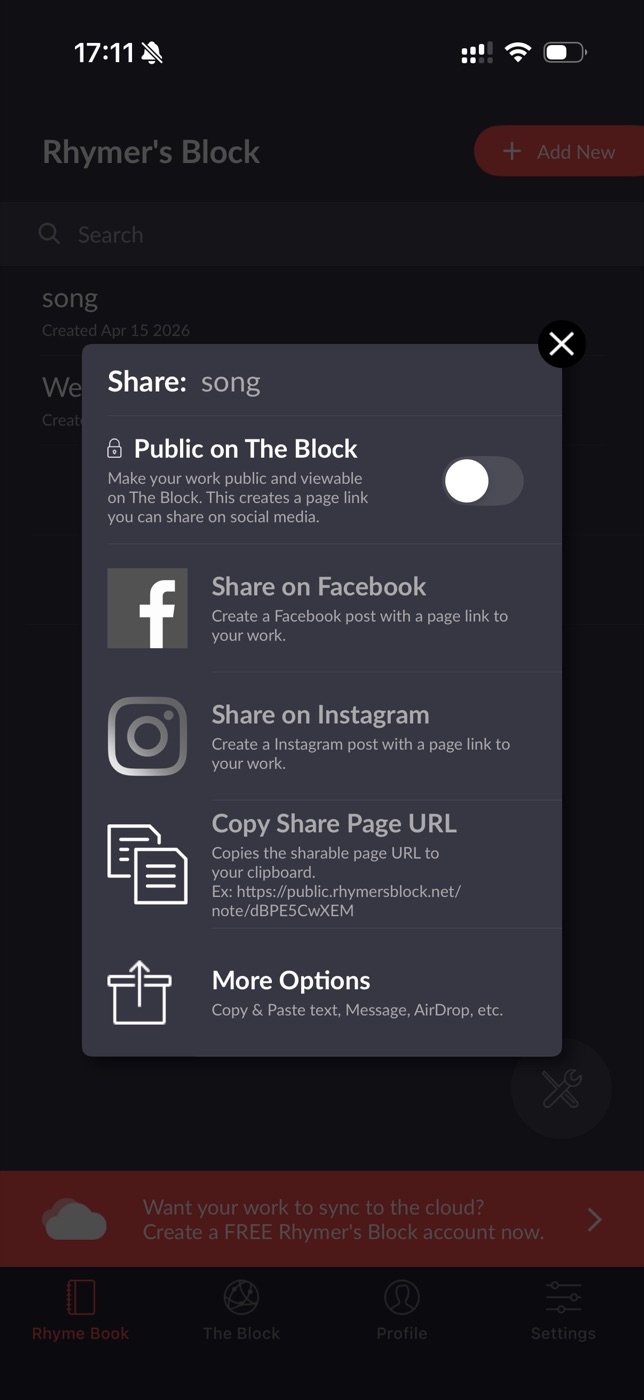
There’s a commercial logic to the nagging: another way Rhymer’s Block makes money is by selling “boosts” that promote your posts in The Block’s algorithm. We can’t speak to how active that network is or whether its users find it valuable. But, as a matter of opinion, paying to boost your own posts in an app’s feed feels a bit icky to us.
Songwriter Studio doesn’t pressure you to share anything. When a song is ready, you can share it as text, a PDF, a custom Songwriter Studio file, or a social-media-ready image, all for free, and only when you choose to.
Songwriter Studio vs Rhymer’s Block: at a glance
| Feature | Songwriter Studio | Rhymer’s Block |
|---|---|---|
| Account required | No (just iCloud on-device) | Effectively yes |
| Ads | None | Yes (removable via Pro) |
| Rhyme detection | Matched rhymes the other missed | Missed a rhyme it suggested itself; one false rhyme |
| Folders | Free | Pro only |
| Rhyme suggestions | Free | “Advanced” suggestions are Pro |
| Sharing | On demand, multiple formats, free | Frequent prompts to post to its social network |
| Subscription | Power-user tools; basics free | Removes ads, unlocks basic features |
Which should you choose?
If you want a social network built around lyrics and you don’t mind ads or a paywall on folders, Rhymer’s Block may suit you.
If you want a focused, distraction-free place to write, that’s what we built Songwriter Studio to be: no account to create, no ads, accurate real-time rhyme detection, free folders and free sharing, and a subscription that unlocks genuine power features rather than the basics.
Everything above reflects hands-on testing in June 2026. Apps change, and we’d rather be accurate than win a point. If you spot something here that’s out of date, tell us and we’ll fix it.
Keep reading: Curious how good rhyme detection works? Start with perfect vs. slant vs. near rhyme, or see how Songwriter Studio handles co-writing a song remotely.