
Based on hands-on testing of Demo in July 2026. Apps change, so if anything here is out of date, let us know and we'll update it.
Demo is a mobile studio for building and recording song demos: chord-progression loops, a multitrack recorder, and stem and MIDI export. Songwriter Studio is a focused writing tool: type chords inline, add guitar tabs, and write freely with no forced structure, unlimited songs on the free tier, and rhyme and syllable help. Pick Demo to produce on your phone, Songwriter Studio to write.
 Free on the App Store. No account required.
Songwriter Studio and Demo are both iOS apps for songwriters, but they are aiming at different halves of the job. Demo is a mobile studio: you build chord-progression loops, record audio on a multitrack recorder, and export stems, MIDI, or a chord sheet. Songwriter Studio is a focused writing tool: you type chords straight into the lyric, add guitar tabs, and write with nothing telling you how the song should be shaped. One is built to produce a demo on your phone. The other is built to write the song.
What follows is what we found using both. This is written by the developer behind Songwriter Studio, so treat it as informed but partial. Demo gets real credit for what it does well, and every claim about it reflects hands-on testing in July 2026.
What is Demo, and what is it good at?
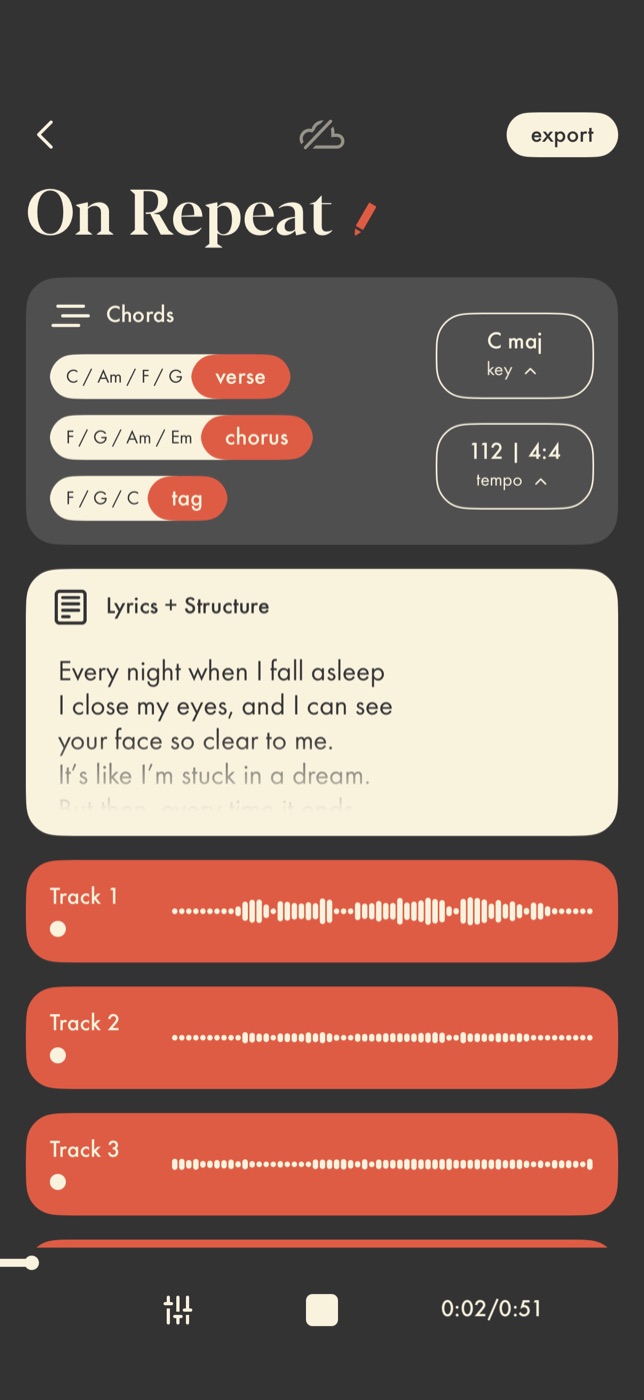
Demo (its full name is Demo: Songwriting Studio) is a capable little studio in your pocket, and the name is honest about its goal. It is built to take an idea all the way to a rough recording. It generates playable chord progressions, either one-tap presets or ones you build, gives you a multitrack recorder for vocals and other audio, and exports a mix, stems, MIDI, or a chord sheet. It also has iCloud sync and a CoWrite mode for sharing a project.
If your process is to sit down and build a demo, chords, a scratch vocal, a rough arrangement, all on your phone, Demo does a lot in one place, and it does the recording part well. Nothing below takes that away. The question is whether you want an app to do that job at all.
How do you add chords in each app?
Chord entry is the clearest difference in how the two apps think.
In Demo, chords are a musical layer you build. You set up a progression, choose or edit the loop, and it lives as part of the song’s arrangement, timed to play back. That makes sense for an app whose end goal is a recording.
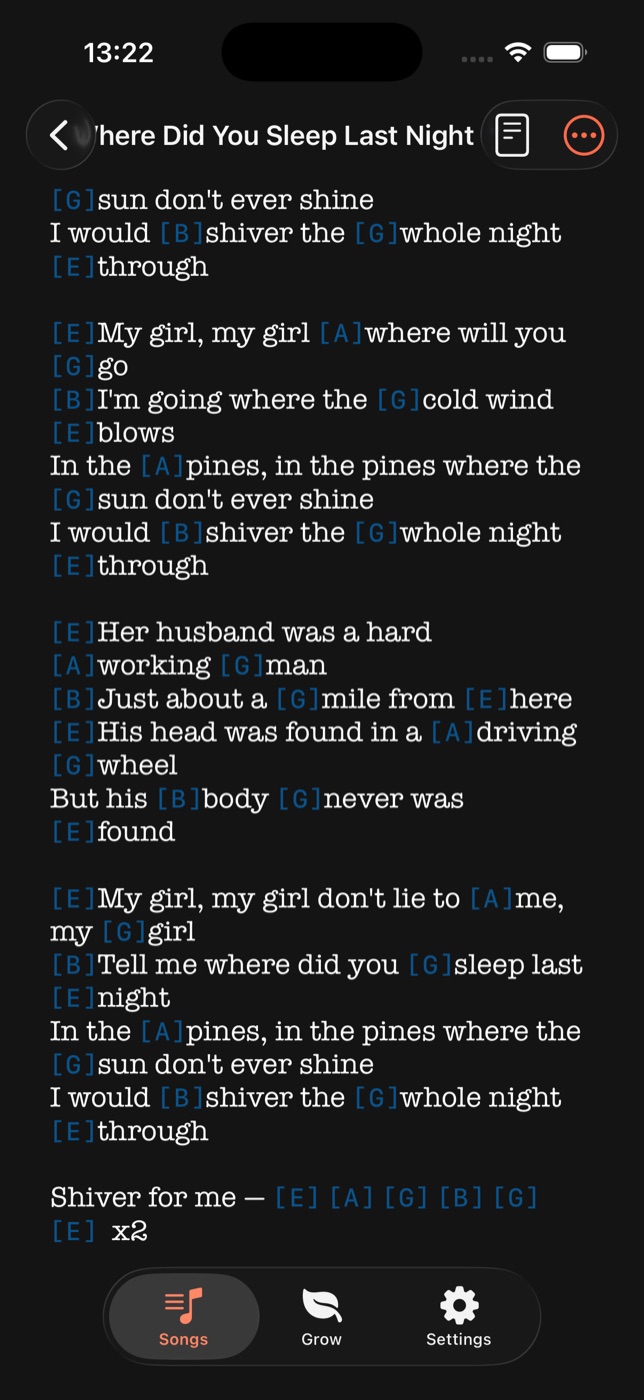
In Songwriter Studio, chords are text you type into the lyric, exactly where they change. Say you are writing “We’ll meet again, don’t know where, don’t know when.” You just type the chords inline:
[D]We'll meet [F#7]again, don't know [Bm7]where, don't know when [B7#5]Songwriter Studio recognizes those as the song’s chords and lays them above the right words. Tap a chord to see its shapes and alternative voicings. There is no progression to build and no timing to record. It is the difference between arranging a backing track and writing a chord chart, and if you mostly want the chart, typing it inline is much faster. Our guide to adding chords to lyrics walks through the full flow, and common chord progressions for songwriters covers the ones worth knowing.
Can you add guitar tabs?
Songwriter Studio can. Tap Tools, then Insert Tab, and a tab editor lets you lay one out. It renders as a plain-text tab, the same format you would see on Ultimate Guitar or Songsters, so it is easy to read and easy to share.
As tested, Demo had no way to add a guitar tab. If tab notation is part of how you write or share songs, that gap matters.
What about recording a demo?
Credit where it is due: Demo’s recording flow is good, and it is the thing Songwriter Studio does not try to do.
That gap is deliberate. Most songwriters we know write lyrics and chords on their phone, then move to a proper desktop Digital Audio Workstation when it is time to record and produce, because that is where the real power is. Demo tries to close some of that gap on the phone, and if a quick multitrack sketch on mobile is what you want, that is a real strength. Songwriter Studio stays on the writing side of the line on purpose, and keeps that side fast and focused rather than doing a bit of everything.
Does the app tell you how to write?
The two apps split hardest here, and this comes down to taste.
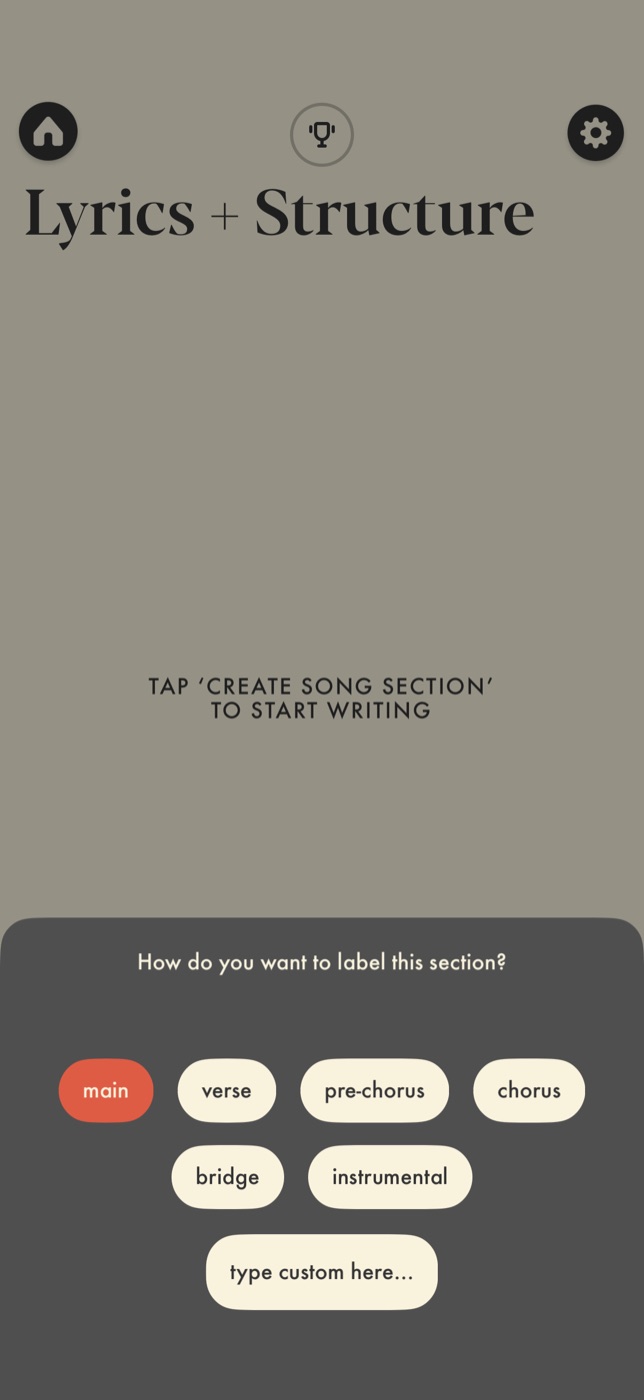
Demo has opinions about how a song gets made. Before you can type a word, it asks you to create and label a section, verse, pre-chorus, chorus, bridge, and it keeps structure, key, and tempo in front of you throughout. For a writer who likes scaffolding, that is helpful.
Songwriter Studio takes the opposite view: it makes no assumptions about how you write. The tools stay invisible until you reach for them, so the screen looks as open as the notes app on your phone. Most writers we know insist the good stuff happens when they are free to be messy. What was going to be a bridge becomes a chorus. A song ends up in an odd shape and works anyway. You keep three disconnected fragments and decide later how they join. An app that asks you to commit to structure, tempo, and key up front can steer you away from that. Songwriter Studio gives you the space first, and the structure, chord, and analysis tools are there waiting for when you want them.
Neither is wrong. If you like being prompted, you may prefer Demo. If you want to forget you are using an app and just write, that is what we built Songwriter Studio for.
What is free, and what is paywalled?
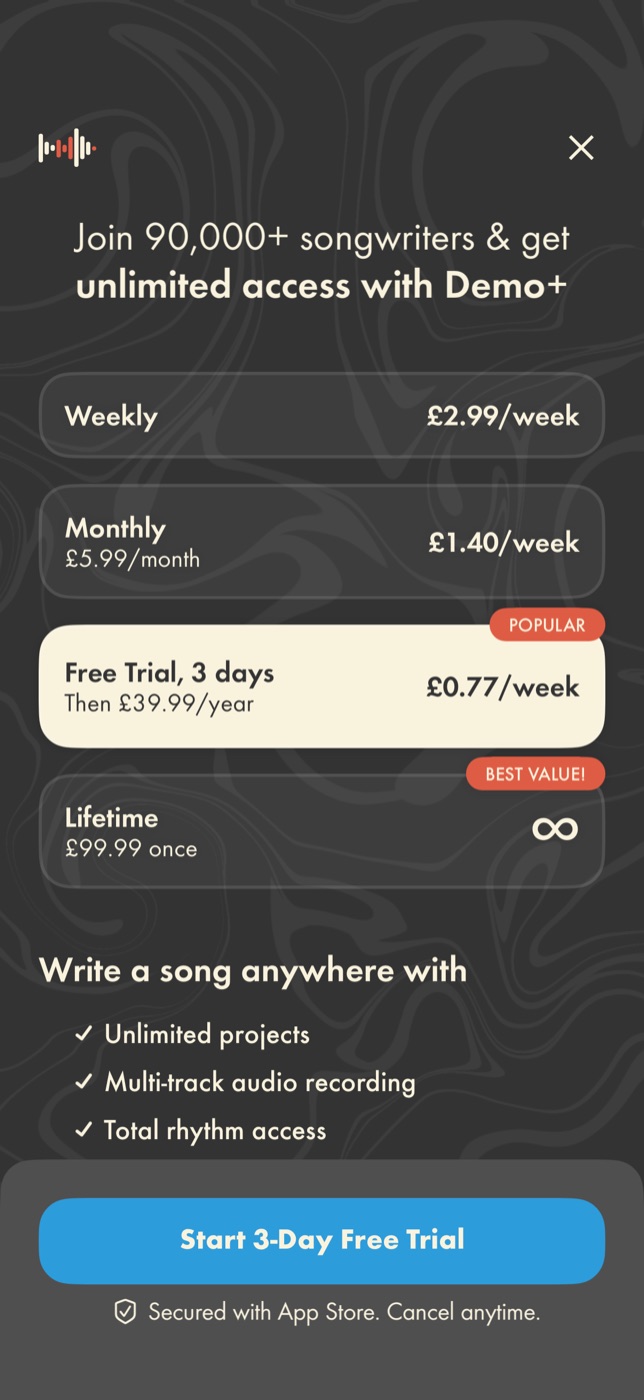
Demo is free to download, but its paywall lists “Unlimited projects” as one of the things you unlock with Demo+. The free tier caps how many songs you can keep, and to write as many as you like you subscribe: as tested, £2.99 a week, £39.99 a year after a three-day trial, or £99.99 for a lifetime unlock.
Songwriter Studio takes a different line. Free users can create unlimited songs, with no cap, and the whole writing toolkit (rhyme detection, syllable counts, chords, tabs, structure) is free. There is an optional subscription for power-user extras, but nothing about writing and keeping your songs sits behind it. We think the worst moment in any creative app is getting a new idea and finding your own tool has locked you out of making it.
Songwriter Studio vs Demo: at a glance
| Feature | Songwriter Studio | Demo |
|---|---|---|
| Core idea | Focused writing tool | Mobile recording studio |
| Chords | Typed inline in the lyric | Built as progression loops |
| Guitar tabs | Yes (plain-text, shareable) | Not as tested |
| Recording | No (write here, record in a DAW) | Yes (multitrack, good) |
| Export | PDF, text, MIDI | Mix, stems, MIDI, chord sheet |
| Structure | Freeform, tools when you want them | Prompts you to set structure up front |
| Free tier | Unlimited songs, full writing toolkit | Limited; full set needs Demo+ |
| Rhyme + syllable help | Built in | Rhyme tool; no syllable counts as tested |
Which should you choose?
Demo fits a particular kind of writer well. If your goal is to build and record a demo on your phone, with backing loops, a multitrack recorder, and audio export, it does a lot in one app and the recording flow is a real strength.
If what you want is a fast, flexible place to write, where you type chords inline, add a tab, lean on rhyme and syllable help, and keep unlimited songs for free with nothing telling you how to shape them, that is what we built Songwriter Studio to be.
Everything above reflects hands-on testing in July 2026. Demo changes, and we would rather be accurate than win a point, so if something here is out of date, tell us and we will fix it.
Keep reading: Learn the inline-chord workflow in how to add chords to lyrics, or find the progressions worth knowing in common chord progressions for songwriters.